By Tomomi, Overseas Team, orosy
The short version. Anything that runs long enough to matter will, at some point, stop in the middle — a timeout, a closed laptop, a dropped connection. The question isn't whether your job dies mid-run; it's what happens when you run it again. My duplicate-product accident taught me to ask for one property by name: safe to run twice.
Key takeaways
- I'm now scaling my Shopify store from a small pilot to thousands of Japanese stationery listings pulled from the orosy headless marketplace API — which means long-running jobs that create hundreds of products at a time.
- One of those jobs got killed halfway through. I re-ran it. It happily created some products a second time — duplicates, live in my admin.
- The fix wasn't technical knowledge on my side. I told my AI, in plain language: "make this safe to run twice." Engineers call this idempotency; you don't need the word to ask for it.
- Three habits came out of that one sentence: keep a ledger of everything created (saved after every single item), cache expensive work like translations so it's never done twice, and never let a script overwrite a file it can't rebuild.
- If you're driving an API through an AI assistant, this is the single highest-value instruction I've found so far. Say it before your first big batch, not after.
Where I left off — and what scaling actually changed
In my first field notes, I connected the orosy API to my Shopify store by talking to my AI, and listed the first few hundred Japanese stationery products in under an hour. That part was honestly easy.
Then I did what you'd naturally do next: pointed it at the rest of the assortment. My working list is now a few thousand products across five stationery brands, and that changed the shape of the work. A batch that creates ten products finishes while you watch. A batch that creates hundreds runs for a long time — translating, filtering images, setting prices, creating listings one by one. You start the job, and you go do something else.
Which is exactly when it happened.
The accident: a job that died mid-run
One of my creation runs got killed partway through — the tool I was running it in has a time limit for foreground jobs, and the batch blew right past it. No error I caused; the run just stopped.
So I did the obvious thing: I ran it again.
And here's the trap. The script pulled the same product list, started from the top, and created some products a second time. It had no memory of the first run. Nothing in it could answer the question "did I already make this one?" — so it didn't ask. I found the duplicates sitting in my store admin: same product, same photos, two listings.
Cleaning that up was annoying but fine. What bothered me was the realization that every long run I'd ever start would carry the same risk. Scale was the plan. This had to be fixed at the root.
The one sentence that fixed it
I didn't fix it with code knowledge, because I don't have much. I told my AI:
"This script must be safe to run twice. If it dies at item 400, re-running it should skip the first 400 and continue — never create anything a second time."
It turns out engineers have a word for this — idempotency — and because the concept has a name, my AI knew exactly what to do the moment I described it. That's the pattern I keep running into with this whole project: you don't need the vocabulary; you need to describe the property you want. The AI supplies the engineering.
Here's what "safe to run twice" translated into, in practice.
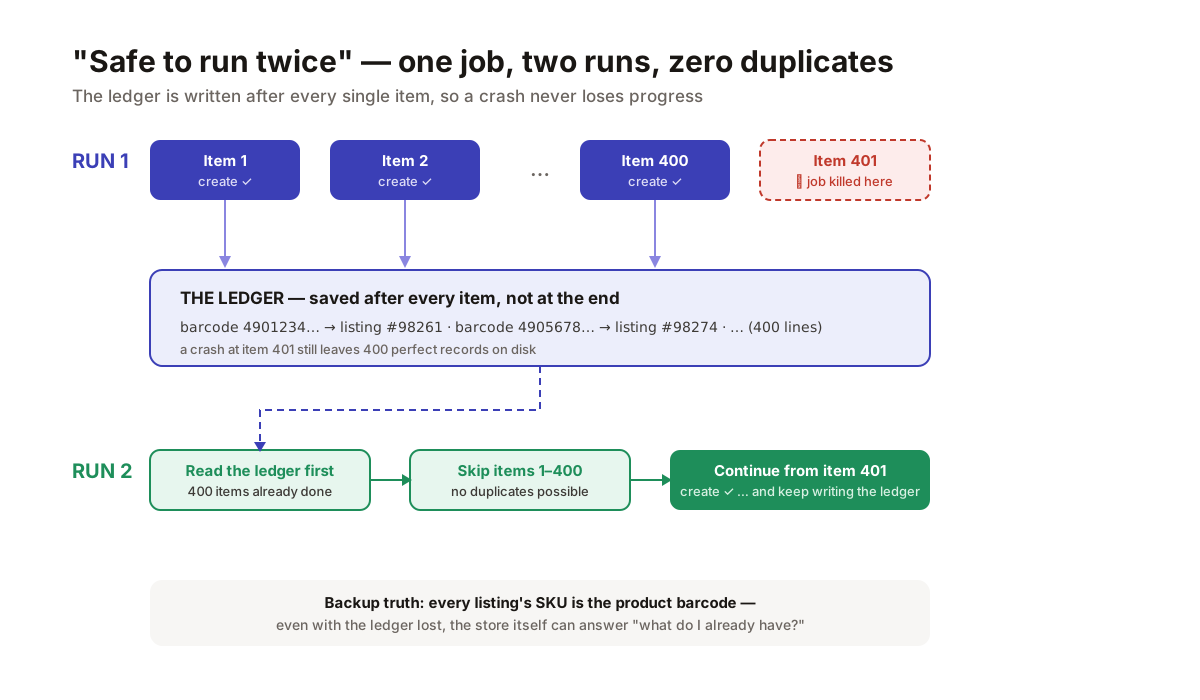
A ledger saved after every item turns a crash from an accident into a pause.
Habit 1 — Keep a ledger, and save it after every item
The script now writes one line to a small ledger file the moment each product is created: the product's barcode (JAN) mapped to the new listing's ID in my store. Not at the end of the run — after every single item. On every run, the first thing the script does is read that ledger and skip anything already in it.
The "after every item" part is the whole trick. A ledger saved only at the end is worthless if the job dies at item 399 of 400 — you'd lose the record of everything. Saved per item, a crash costs you nothing: re-run, skip, continue.
Habit 2 — Cache anything expensive, keyed by something stable
Product descriptions get translated from Japanese to English before listing. That work now lands in a translation cache keyed by each product's barcode. If a run dies and restarts — or if I re-list a product next month — nothing is ever translated twice.
The lesson generalizes: any step that costs meaningful time or money (translation, image processing, classification) should write its result down under a stable ID, so the pipeline can be re-run freely without re-paying for finished work.
Habit 3 — Never let a script destroy what it can't rebuild
My second near-miss the same week: a data-preparation script that started by wiping its output file and rebuilding it from scratch. Run it for brand B, and brand A's prepared data — an hour of API calls — vanished. Nothing broke loudly; the file was simply gone.
The rule I gave my AI afterward: a script may only overwrite what it can cheaply recreate. Anything else gets appended to, or backed up first. Fetched raw data is cheap — you can fetch it again. Accumulated state (ledgers, caches, curated lists) is precious — treat it like the asset it is.
One more layer of safety: let the store itself remember
Each listing I create carries the product's barcode as its SKU. That means even in the worst case — ledger lost, cache lost — my store itself can answer "what do I already have?" with a simple SKU lookup. The ledger makes re-runs fast; the SKU convention makes the truth recoverable. Two independent ways to know what exists.
Why this matters if you're building on a headless marketplace
A headless marketplace hands you an engine and says: build your storefront your way. The freedom is real, but it means your side of the pipe — the scripts that pull, transform, and list — is yours to keep honest. Nobody's platform UI is going to deduplicate your imports for you.
The good news is that the entire fix fits in one instruction. If you take a single thing from this post:
Before your first big batch job, tell your AI: "Make this safe to run twice — keep a record of everything created, saved after every item, and skip those on re-runs." Say it on day one. It's much cheaper than saying it on day two.
Next up in Field Notes: what happened when I dug into product images at scale — and why "does this photo work for an overseas buyer?" turned out to be a more interesting question than I expected.